
Run open-source AI models on your own machine.
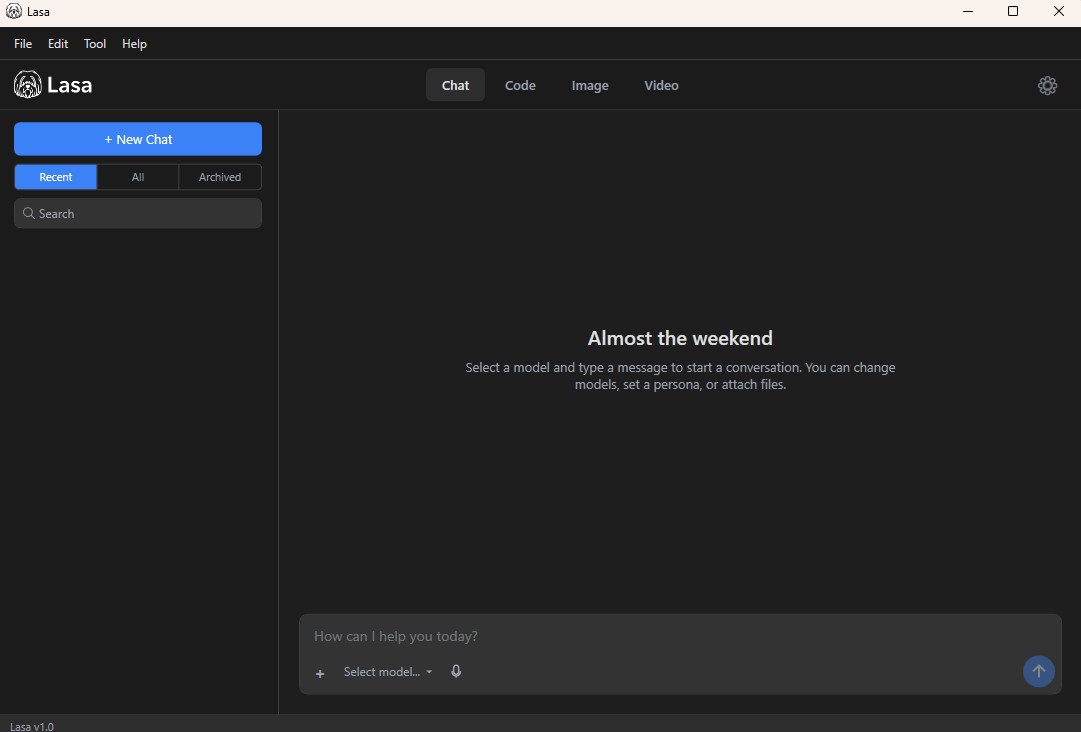
Lasa is a Windows desktop app that runs large language and diffusion models from Hugging Face directly on your hardware. Five inference engines. Chat, code, images, and video. Private, fast, offline-capable.
Five inference engines, one app
Pick the engine that fits the model and your hardware. Lasa routes each model to the right runtime automatically — and lets you override per model.
llama.cpp
GGUF · CPU + CUDA · in-process
The default engine, embedded directly in Lasa via LLamaSharp. Runs GGUF files on any Windows machine — CPU or NVIDIA GPU. No server, no setup.
ONNX Runtime GenAI
ONNX · CPU · in-process
Microsoft's quantized ONNX format, validated end-to-end with Phi-3. Excellent CPU performance on small models. Auto-detected from genai_config.json directories.
vLLM
HF safetensors · NVIDIA · OpenAI-compat HTTP
The high-throughput PagedAttention server. Run it via Docker on Windows, point Lasa at it, and chat. Validated with Gemma 3 in Docker on RTX-class GPUs.
ExLlamaV2
EXL2 / safetensors · NVIDIA · via TabbyAPI
The fast EXL2-quantized runtime, accessed through TabbyAPI's OpenAI-compatible HTTP layer. Aggressive quantization for the most VRAM-efficient quality at a given size.
TensorRT-LLM
.engine · NVIDIA · via Triton or NIM
NVIDIA's compiled-engine runtime for maximum throughput on supported GPUs. Connect to Triton Inference Server with the OpenAI frontend, or to a NIM container.
Automatic routing
Lasa inspects each model and picks the right engine — no config files, no engine flags. The active engine appears next to the model name in the composer.
Phi-3-mini • ONNX
llama.cpp and ONNX run inside Lasa with no extra setup. vLLM, ExLlamaV2, and TensorRT-LLM connect to a server you run — locally via Docker / WSL2, or anywhere reachable on the network.
Four workflows under one roof
Lasa is more than a chat box. Each tab keeps its own model list, its own conversation history, and the right tools for the job.
Chat
General-purpose conversation with any text model. Personas, system prompts, conversation history, and voice input.
Code
Programming-focused mode with syntax highlighting and tool use. Ideal for code generation, refactoring, and debugging assistance.
Image
Diffusion image generation with Stable Diffusion, Flux, and other open models. Saved straight to your ~/Lasa/Images folder.
Video
Diffusion video generation with text-to-video models. Output goes to ~/Lasa/Videos, ready to share.
Browse and download models, in-app
Lasa includes a built-in Hugging Face browser. Search by name, switch between GGUF and ONNX formats, see file sizes and quantization variants, and download — without leaving the app.
- Curated recommendations for Phi, Llama, Qwen, and Gemma
- Resumable downloads that survive flaky networks
- Per-variant downloads for ONNX directories
- Optional HF token for gated models
Built around your privacy
Lasa is a host. You bring the models, you own the data, you control the runtime.
Privacy-First
Conversations stay on your machine. SQLite database in %LOCALAPPDATA%\Lasa, no telemetry, no third-party tracking.
Open-Source Models
Thousands of models from Hugging Face — Qwen, Llama, Phi, Gemma, Stable Diffusion, Flux, and more. Pick what fits your task and your hardware.
Offline-Capable
Once a model is downloaded, Lasa runs without an internet connection. Get AI assistance on flights, in cafés, behind firewalls.
Personas
Save reusable system prompts as personas. Switch between a code reviewer, a writing editor, and a study tutor without retyping setup every time.
Voice Input
Built-in microphone capture for hands-free prompting. Useful for long inputs and accessibility.
CLI Included
Lasa ships with a command-line interface for scripting, automation, and listing or exporting conversations from the terminal.
From install to first response
A few minutes, no terminal commands required.
Install
Download Lasa-1.1.0-Setup.exe and run it. Activate with a license key or start the free trial.
Pick a model
Open the Hugging Face browser. Search, pick a quantization, download. Or import a folder you already have.
Choose an engine
Lasa picks one automatically. Want vLLM or TensorRT-LLM speed? Connect a remote endpoint in two clicks.
Chat
Type, attach files, dictate by voice. Switch tabs to write code, generate images, or render video.
System requirements
Lasa runs on modest hardware and scales up with whatever you have.
- OSWindows 10 or later (64-bit)
- CPUx64 with AVX2
- RAM8 GB
- Disk~10 GB for app + small models
- GPUNone (CPU inference)
- OSWindows 11
- CPUModern x64, 8+ cores
- RAM16-32 GB
- DiskSSD with 50+ GB free
- GPUNVIDIA, 8 GB+ VRAM
For vLLM, ExLlamaV2, or TensorRT-LLM, you'll also need a server reachable from the machine running Lasa — Docker Desktop with WSL2 is the easiest path on Windows.
Download Lasa
Get Lasa running on your Windows machine in seconds.
Download for WindowsRequires Windows 10 or later
Get Lasa
Purchase a license key to unlock the full power of Lasa on your Windows machine.
$25